TwitchCon, November 13

Thanks for scanning.

LuckyBot is a free desktop app that runs your alerts, chat, chatbot, and subathon from your own PC with just a Twitch login. Here is the two-minute version.

Your first alert in five steps

  1. Install the app and sign in with Twitch.
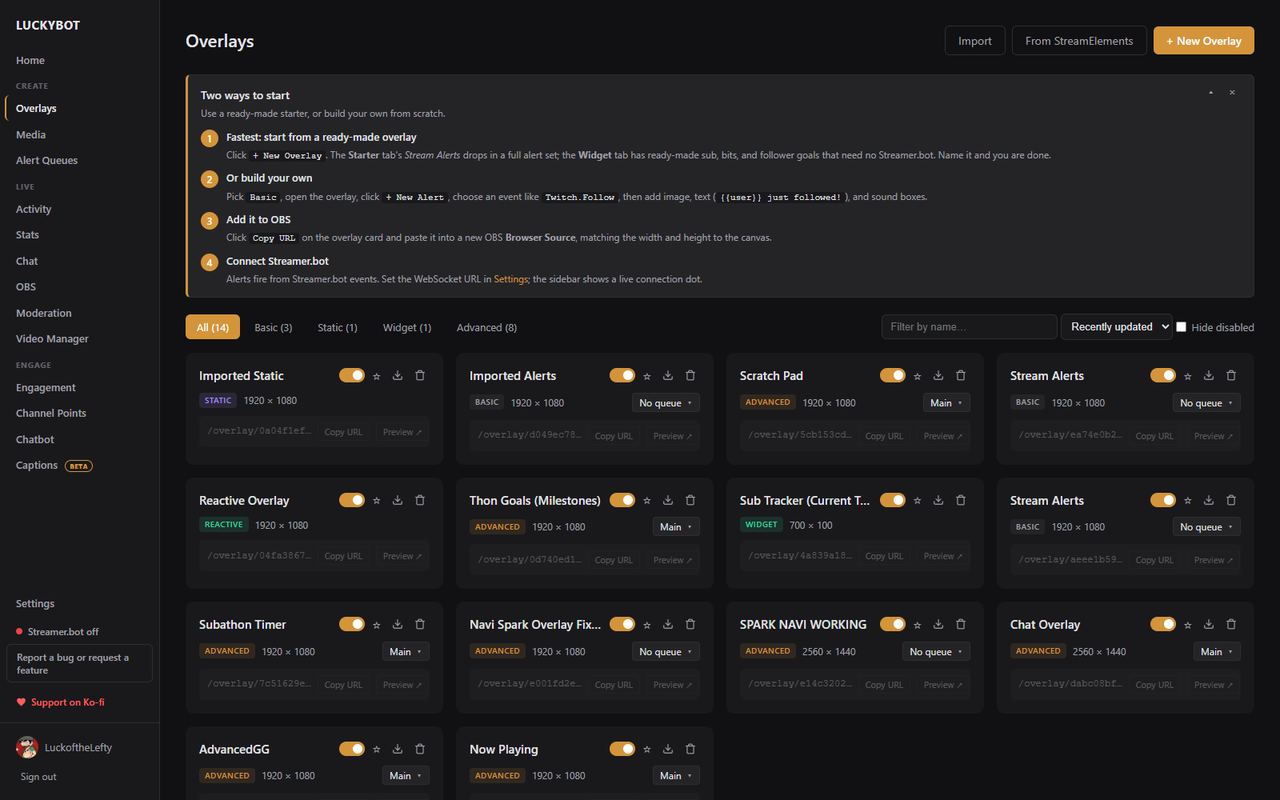
  2. Click Overlays, then New Overlay, and pick Stream Alerts from the Starter tab.
  3. Click Copy URL on the overlay and paste it into an OBS Browser Source.
  4. Open the overlay and hit Test on any alert.
  5. Have a friend follow you. That is it.

Coming from StreamElements, Nightbot, Firebot, Streamlabs, or Mix It Up? The importers bring your overlays, commands, timers, and quotes over.

Keep in touch
QR code for luckybot.app/twitchcon

This page is luckybot.app/twitchcon. Share it with a streamer friend.

Bugs and ideas go straight to the developer from the app's Report a bug button, or find LuckoftheLefty on Twitch.

twitch.tv/luckofthelefty
Why streamers switch

One window instead of five tabs.

  • Alerts fire from Twitch directly, in under a second, with no cloud page to keep open
  • A subathon timer that runs on the server and survives OBS crashes
  • A chatbot that imports your existing commands and runs even with the app minimized
  • Chat overlay for OBS that restyles live, and a chat dock inside OBS
  • Free, open source, under 100 MB, updates itself
The Overlays page